Releasing new versions
This guide walks you through how we publish new versions and what you need to do to keep things running smoothly.
Spor is available as multiple React packages, and we use Changesets 🦋 to handle versioning and publishing. Our versioning follows Semantic Versioning (SemVer)—a system that tells users whether a new version is backward-compatible, introduces new features, or contains bug fixes.
🔄 Making Changes to a Package
If you’ve made a change to a package and want others to benefit from it, you need to create a Changeset. You can do this by running:
npx changeset
💡 Fun fact: npx lets you run npm scripts without installing them globally. If you have Node.js installed, you already have npx! 🎉
This command will guide you through a few steps. Here they are described in more detail:
Step 1: Select packages
After running npx changeset you will first be asked to select which packages that should be included in the changeset. Navigate using the arrows on your keyboard, and select the relevant packages by clicking on the spacebar. Under "changed packages" you will see those that are recommended that you add.
When you have selected the relevant packages, press enter.
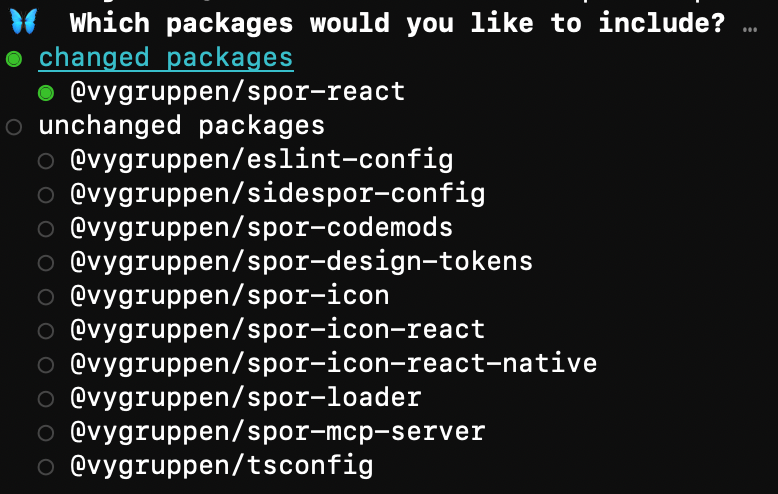
Step 1: select packages that should get a version bump
Step 2: Select release level
This step will decide what type of release the update will be. There are three levels to choose from:
- Major version bump (
1.x.x → 2.0.0): Large-scale breaking changes (rare—maybe once or twice a year). Require a larger change to the codebase. - Minor version bump (
1.1.x → 1.2.0): New features or functionalities, like adding/removing a component, prop, or function. Could also be a minor breaking change, but will not require a larger change to the codebase. - Patch version bump (
1.1.1 → 1.1.2): Bug fixes, refactors, or other small updates that don’t introduce new functionality.
Note: Breaking changes are typically introduced only in major version releases. For Spor, we have chosen to also allow breaking changes in minor releases, as the platform is still in an early and rapidly evolving stage where such changes occur more frequently. This approach helps us avoid unnecessary major version increments while Spor continues to mature.
If the changes to a package should result in a major release, use the keyboard arrows to navigate and press the spacebar to select packages. Once you’ve made your selections, press Enter.
If the changes should result in a minor release, press Enter to skip the “major bump” step. Then use the arrows and spacebar to select the relevant packages, and press Enter to continue.
If the changes should result in a patch release, press Enter on both the major and minor steps without selecting any packages. The packages will automatically be included in a patch bump.
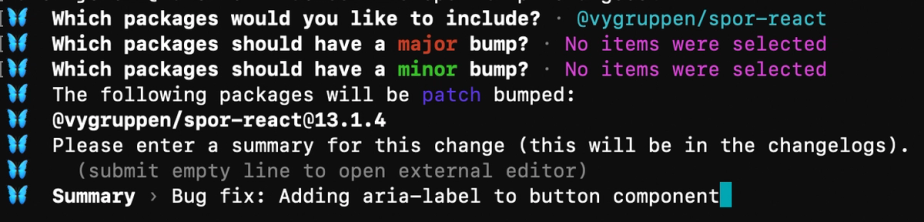
Step 2 and 3: Example where the spor-react package will get a patch-bump
Step 3: Writing the Changelog
After selecting the version bump type, you’ll be asked to write a changelog message. This should describe:
✔ What changed
✔ How it affects users
✔ (If it's a major change) How users should update their code
Changelog messages should always be in English.
Step 4: Commit and push
Once done, a file will be created in the .changeset/ folder. Commit this file along with your changes. You can even include multiple Changeset files in the same pull request if needed.
🚀 Publishing New Versions
When your pull request is merged, and it contains Changeset files, GitHub will automatically create a new pull request called "Version Packages".
📝 This PR collects all pending Changesets and prepares a release. More changes can be added to it until you're ready to publish.
✅ Once the "Version Packages" PR is merged, new versions will be published within ~5 minutes.
💡 Pro Tips
🔹 Try to bundle multiple changes into the same release, especially for major or minor version bumps.
🔹 Avoid unnecessary major bumps—breaking changes require effort from all consumers.
🛠 Troubleshooting
If something goes wrong during publishing, here’s what to do:
1️⃣ Try a Retry – Sometimes, builds fail due to temporary network issues. Running the process again might solve it.
2️⃣ Versioning Errors? – If you're publishing multiple packages at once, you might hit a version mismatch issue (we’re working on fixing this 🤞). If the build complains about a missing version, here’s the fix:
- Revert the "Version Packages" PR and merge it.
- Wait for a new "Version Packages" PR to appear.
- Edit the branch and update the version number to an earlier version.
If you're stuck, reach out to the Spor team or Team Kanaler on Slack! 🚀